


 Login
Login
X-Change and Active Directory Authentication[ X-Change Mail ] X-Change fully supports Active Directory as an alternative authentication method. In order to configure X-Change for A.D authentication please follow the below simple steps. Both, local and 'Kerberos' authentication should be enable. IMPORTANT:
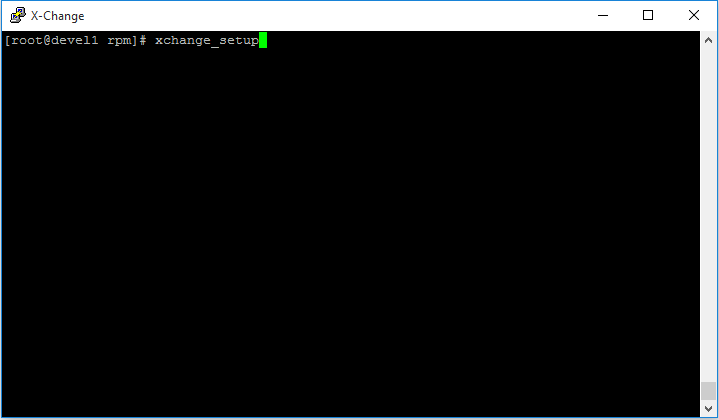
1. Login to your Centos CLI as 'root' and run the 'xchange_setup' command.
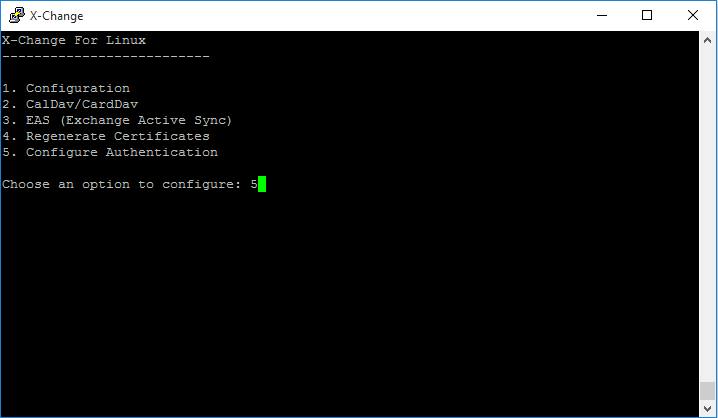
2. From the Menu choose the 'Configure Authentication' option.
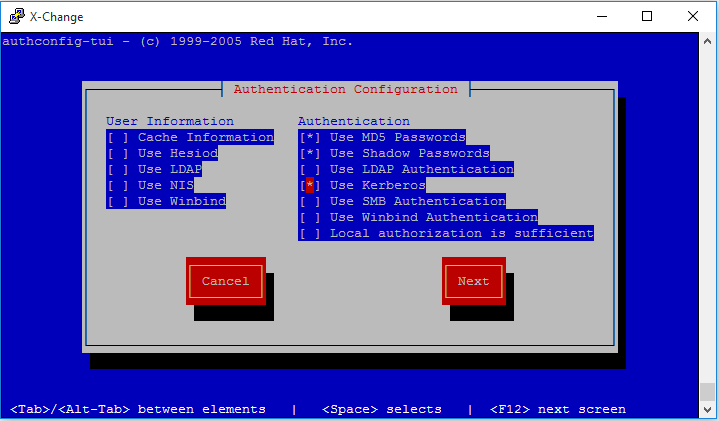
3. Add 'Kerberos Authentication' to be one of the authentication methods and click 'Next'
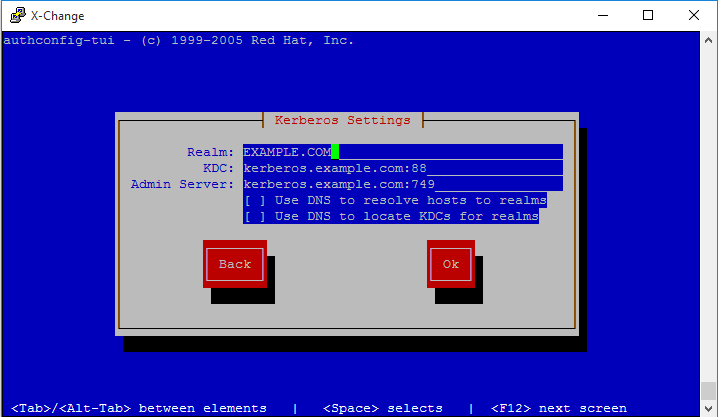
4. Configure 'Kerberos' for Active Directory
X-Change and Active Directory Authentication[ X-Change Mail ] X-Change fully supports Active Directory as an alternative authentication method. In order to configure X-Change for A.D authentication please follow the below simple steps. Both, local and 'Kerberos' authentication should be enable. IMPORTANT:
1. Login to your Centos CLI as 'root' and run the 'xchange_setup' command.
2. From the Menu choose the 'Configure Authentication' option.
3. Add 'Kerberos Authentication' to be one of the authentication methods and click 'Next'
4. Configure 'Kerberos' for Active Directory
|
X-Change and Active Directory Authentication[ X-Change Mail ] X-Change fully supports Active Directory as an alternative authentication method. In order to configure X-Change for A.D authentication please follow the below simple steps. Both, local and 'Kerberos' authentication should be enable. IMPORTANT:
1. Login to your Centos CLI as 'root' and run the 'xchange_setup' command.
2. From the Menu choose the 'Configure Authentication' option.
3. Add 'Kerberos Authentication' to be one of the authentication methods and click 'Next'
4. Configure 'Kerberos' for Active Directory
X-Change and Active Directory Authentication[ X-Change Mail ] X-Change fully supports Active Directory as an alternative authentication method. In order to configure X-Change for A.D authentication please follow the below simple steps. Both, local and 'Kerberos' authentication should be enable. IMPORTANT:
1. Login to your Centos CLI as 'root' and run the 'xchange_setup' command.
2. From the Menu choose the 'Configure Authentication' option.
3. Add 'Kerberos Authentication' to be one of the authentication methods and click 'Next'
4. Configure 'Kerberos' for Active Directory
|